


-

 Orders & Payments
-
Placing Orders
Placing OrdersHow do I check the balance on my Gift Card or eVoucher?
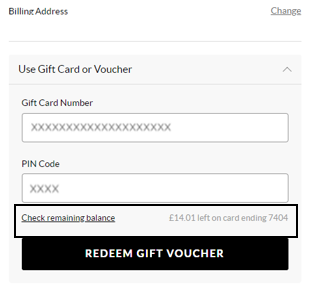
To view your balance on a Gift card or eVoucher you will need to add your items to the basket first and then once you've selected your delivery option you will be taken to the payment section. You will be presented with all the payment options available for your order. Select ‘Use Gift Card or eVoucher’ and enter your eVoucher/credit note code and pin number and then select ‘Check remaining balance’, you will then be able to see your balance.
Vond je dit artikel nuttig? Yes No
Feedback sturenBedankt voor je feedback.
Als je verder wilt uitweiden over hoe we deze inhoud kunnen verbeteren, kun je hieronder specifieke feedback delen met de auteur van het artikel.
Let op: via deze feedback kom je NIET in contact met de klantenservice. Als u contact wilt opnemen, drukt u op Annuleren hieronder en vervolgens op Neem contact met ons op en volg de stappen.
-
Placing Orders